Winnow, in detail.
A closer look at what you'll see in Chrome, how the schedule and limits work, and how sellers might set it up.
Everything you need, beside the feed.
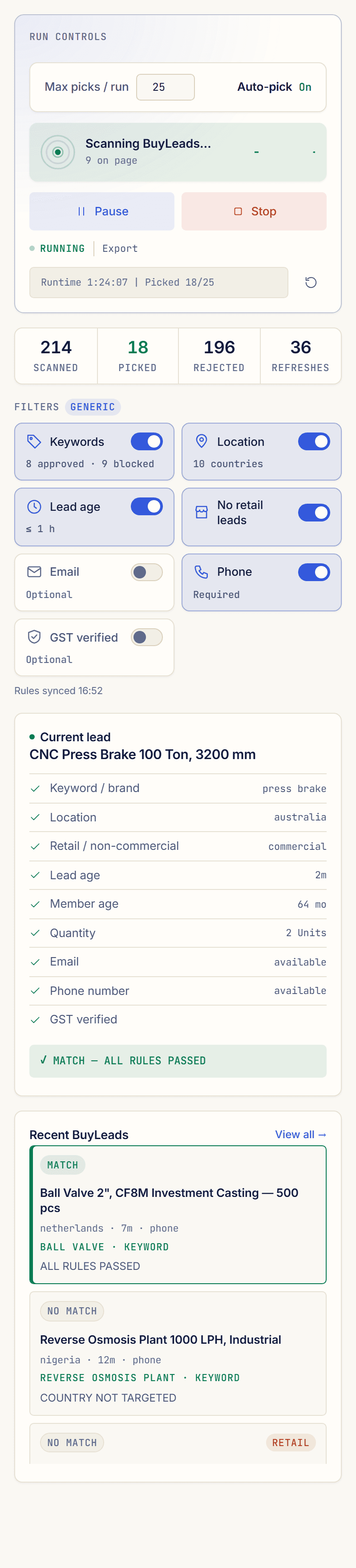
Winnow lives in Chrome's side panel next to your BuyLeads page — five tabs, no extra software. Your rules and schedules are edited in your web dashboard.
Example data · switch tabs
Start, pause or stop — and see why
See what's being scanned, picked and rejected, and every check on the lead in front of you, with the reason. Turn auto-pick on or off and cap the picks per run.
Your rules, switched on or off
Each rule from your dashboard, with its value. Switch one off on this browser, require a phone number, an email or GST verification, and press Sync to pick up a dashboard change at once.
The schedule this browser follows
Its days, hours and run-and-pause cycle, as set in your dashboard.
Every decision, with its reason
A running log of every decision. Filter by picked or rejected, search it, and export it to CSV.
Your licence, limits, and what is sent
Connect to your dashboard with a short code, set your daily pick limit and the gap between picks, and read exactly what is sent to our server.
Automation, on your terms.
Your schedule is set in your dashboard, and you decide how far auto-pick goes.
Chrome has to stay open for scheduled runs, and timing is approximate because Chrome schedules background work only about once a minute.
Your hours
Active days, start and stop times — and, if you like, run for a while, rest, and repeat. Save a few schedules and choose one per seller account.
Your pace
A cap per run, a cap per day, and a minimum gap between contacts. Winnow stops itself when it hits a cap.
Your say
Pause or stop from the side panel at any time.
Confirmed, not assumed
A contact only counts once Winnow sees that it went through.
Built for sellers who work the BuyLeads feed.
If your feed is busy and only part of it fits what you supply, Winnow is for you. Here are some ways a seller might set it up — every seller's rules are their own.
Sellers who export to specific countries
Name your target countries. Other markets, and retail requests, are skipped.
Export mode · target countries · retail rejected
Suppliers serving particular states
Use India mode and list the states you deliver to.
India mode · your states
Sellers with a broad catalogue
Paste your catalogue for keyword suggestions, then add the words that should rule leads out.
Approved + restricted keywords · catalogue suggestions
Teams that want to start carefully
Judge the free trial on real results, then keep auto-pick off on your plan, read the log, and switch it on when you're ready.
Free trial · then auto-pick off on your plan
Not the right fit if…
You want a fully hands-off service that runs without your Chrome open, you can’t accept the account risk described below, or you’re looking for new buyers rather than better use of the leads IndiaMART already shows you.
Questions a serious seller asks.
No. Winnow works in the tab you already signed into. It never accesses your password or session cookies.
Yes: 7 days free, with up to 10 picks. Request access and we'll set up your rules and start your trial on your own IndiaMART feed.
Yes. Winnow needs an active licence to run, and your free trial is one, so there's nothing to buy first. On a plan, monitor-only mode (auto-pick off) doesn't use any picks.
Deciding whether a lead fits happens in your browser. Our server receives usage counters and short rejection reasons; a summary of each lead your rules match; and, for each lead Winnow picks, the full lead including the buyer's contact details, stored encrypted and deleted after 180 days. Rejected leads aren't sent.
During your free trial, yes: it picks up to 10 leads that pass your rules, so you see real results. On a plan, auto-pick is a switch. Leave it off to only watch and log, and turn it on when you're ready.
Winnow is an independent tool and isn't endorsed by IndiaMART. Automating the seller interface may conflict with IndiaMART's Terms of Use, and IndiaMART could restrict a seller account. You set it up, you run it, and you accept that risk.
It reads the leads already on your own screen and clicks a button you'd otherwise click yourself. It doesn't visit the buyer directory or any page you're not looking at.
Auto-pick pauses and Winnow tells you. Clear the check yourself, then press Start. It never tries to solve or bypass it.
The parts that read the page can stop working. Fixes are delivered from our server, so you don't need to reinstall — but there can be a gap until one ships.
Yes. Winnow runs in your browser, not on our servers, so scheduled runs only happen while your computer and Chrome are running.
You edit your rules in your dashboard. The extension checks in about every 15 minutes and picks up the change, or straight away when you press Sync in its side panel.
As many as your licence allows. It's tied to the browser profile it's activated in. Copying an install to another machine isn't permitted, and copies are detected.
Chrome. Winnow uses Chrome's side panel; other Chromium-based browsers that support it may work too.
Your product list or catalogue, the countries or states you sell to, and roughly how many BuyLeads you see a day. Request access below and we'll take it from there.
Tell us what you sell. We’ll get you set up.
Send your category and roughly how many BuyLeads you see a day. We’ll help you write your first rules and start your free 7-day trial, so you see Winnow work on your own feed before you pay.
Plans start at ₹5,999 a month + GST. See pricing. Free 7-day trial, up to 10 picks.